Be yourself; Everyone else is already taken.
— Oscar Wilde.
This is the first post on my new blog. I’m just getting this new blog going, so stay tuned for more. Subscribe below to get notified when I post new updates.
Be yourself; Everyone else is already taken.
— Oscar Wilde.
This is the first post on my new blog. I’m just getting this new blog going, so stay tuned for more. Subscribe below to get notified when I post new updates.
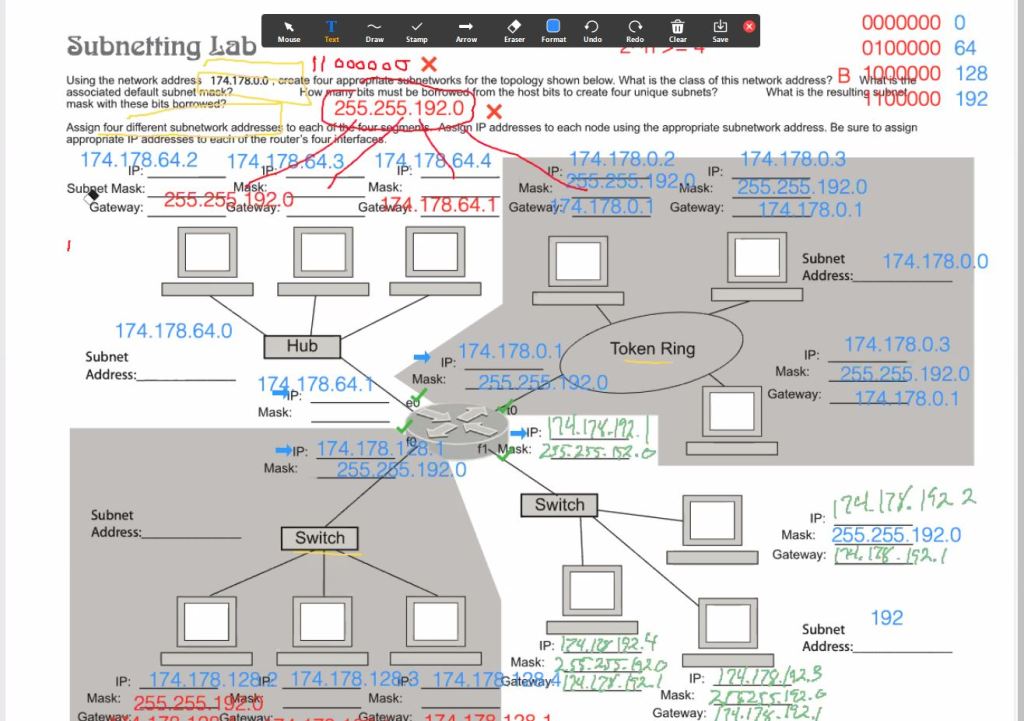
Learning Objectives: Learn subnetting during class
Equipment List: Computer, Zoom
Notes, Observations, and Questions: I’m having a little issue keeping up with all of this stuff, but I think it’s mostly just a memorization thing, I will eventually get a full understanding.
Diagrams, flowcharts, and figures: (I was the one handling the token ring area)

References: N/A
Conclusion: I’m having a little trouble grasping everything relating to subnetting, but I am confident it will click soon.
Learning Objectives: Learn how to host a website using Apache.
Equipment List: Computer, Pi computer, HTML editor
Notes, Observations, and Questions: Surprisingly simple to do, might have to get a fan for my pi so I can leave the site up.
Diagrams, flowcharts, and figures: N/A
References: Google, Raspberry Pi website
Conclusion: It was a lot easier than I thought it would be, I will do this in the future again
Learning Objectives: Learn how to use editing software.
Equipment list: Computer, Windows Video Editor, Youtube, and Hitchcock Clip
Notes, Observations, and Questions: Editing video is for the most part pretty easy, given how convenient they make the tools.
Diagrams, flowcharts, and figures: N/A
References: Google, Discord
Conclusion: It was pretty easy to create the video, more so than I thought, anyway
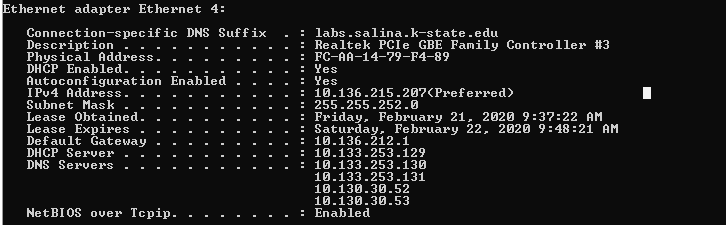
Learning Objectives: Learning about how to change IP, and connect Network
Equipment list: Computer, Router, Handout
Notes, Observations, and Questions: It was easier to change IP on windows 10 than I anticipated
Diagrams, flowcharts, and figures:

References: Handout for Lab, Google
Conclusions: In conclusion, I learned how to change IP, connect to a network, and how to use some commands on linux.
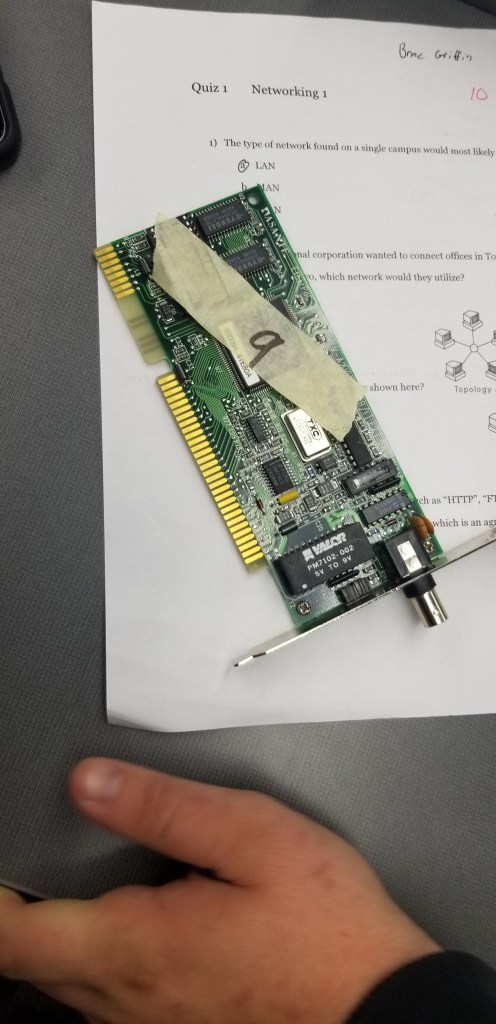
Learning Objectives: Learning about routers, hubs, and switches
Equipment list: Routers, Hubs, Repeaters, Handout
Notes, Observations, and Questions: The devices are more diverse than I would have thought
Diagrams, flowcharts, and figures:


References: Handout for Lab, Google
Conclusions: In conclusion, I learned more about what routers are and how switches work, and observed the differences between them
Learning Objectives: Learning individual components
Equipment list: Old computers for dismantling

Notes, Observations, and Questions: Learned about older computers and antique parts.
Diagrams, flowcharts, and figures: N/A
References: Handout for Lab
Conclusions: In conclusion there are more diverse parts to older computers than I had anticipated. I had already torn apart a few computers to a certain extent so a large amount of this was review.
Question: How many I/O ports did the computer I examine have?
Answer: I counted 20
Question: What is the purpose of the CPU HDD and RAM
Answer: the CPU gives instructions, the HDD has non-volatile memory while the RAM has volatile memory.
Magnetic Core Memory:

Learning Objectives: To learn how to set up RJ-45s
Equipment list: Cable, RJ-45 Jacks, Punch Down Tool, Crimper tool, cable tester
Notes, Observations, and Questions: Harder than I thought it would be, might get some of my own cables and equipment and test it out.
Diagrams, flowcharts, and figures: N/A
References: Handout for Lab
Conclusions: In conclusion, appropriately making cables was generally something I did not even consider, and I think I take for granted how complex these things can be.
Learning Objectives: Publish a website using WordPress
Equipment list: Computer in Lab
Notes, Observations, and Questions: N/A
Diagrams, flowcharts, and figures: N/A
References: Handout for Lab
Conclusions: In conclusion, it is somewhat easy to use WordPress to publish a website. Due to the relative ease of launching this site, I do not have much insight.

 James' Networking Blog